An Active Learning Strategy for Using Videos in Class
Reaction videos are a modern form of annotating a text, and they teach students the same critical thinking and connection skills.
Your content has been saved!
Go to My Saved Content.
Students are used to watching videos by themselves. When they watch videos as a class, many struggle to follow them and maintain focus. However, videos can still be a highly effective and transformational educational tool when you have students make a switch: from just watching videos to making reaction videos.
Extremely popular on social media, reaction videos involve a person or small group recording themselves reacting to another video. Essentially, reaction videos are a modern form of annotating a text, and the people doing the reacting are doing the same things we want students to do when they’re annotating: asking questions and making connections with other things they already know.
Teaching students how to record reaction videos can help turn a passive and sometimes inauthentic learning experience into an active and engaging one. Plus, students will learn technology skills at the same time, which helps erode the digital skills divide.
Tools Students Can Use
It’s surprisingly easy to create reaction videos. Students need a computer and a screen recording program. Chromebooks come with the Screencast app, and when students are working on other computers, they can use programs like Screencastify. Additionally, if you’re tech savvy and can download programs to your computers, consider OBS, a free program for live streaming and recording that many of our more online students know from watching popular streamers.
An important consideration is whether or not the program allows for recording system audio while also recording what students say. This means that both the audio from the video that the students are watching and anything the students say will be captured in the final video.
It also helps if students have headphones with microphones. That way, an entire classroom of students can record at the same time while not being distracted by other students. There are times, such as for a final project, when students might want less background noise. In these situations, use other spaces and/or a station rotation model to have fewer students recording at the same time.
The Process I Teach
Introduce students to reaction videos by showing them a few examples of people reacting to movie trailers, songs, or something similar. Then help students learn the difference between watching and reacting to videos. Watching is passive. The viewer sits and takes in information. Reacting is active. Viewers respond verbally and physically to show their thinking and to be entertaining.
Next, have students practice by choosing their own video, or give them a highly engaging video to react to. Most students start by having fun and mimicking what they see online, saying things like, “Don’t forget to smash that like button.” This is great—the goal at this point is engagement.
From then on, most students are hooked, and it becomes an iterative process. To help students move beyond just being silly, show clips of students demonstrating high-level commentary and analysis, which students will usually do when they pause the video they are watching. In these moments, students will usually go into greater detail and demonstrate complex thinking.
Once students are confident, introduce specific analytical frameworks (such as signposts like “Notice” and “Note”), or challenge students to increase the complexity, frequency, and variety of their commentary and analysis. Have them watch their own videos (or the videos of other students), and then ask: How complex is what they are saying? How often are they talking? What type of comments are they making? Additionally, you could give them prethinking questions or insert questions into the video they’re watching to focus their reactions on specific themes or important learning.
For students who feel stuck or who are unsure of what to say, it can be helpful to provide a reaction menu or sentence starters. Additionally, if there are any students who are uncomfortable recording themselves, first see if they will record just their voices. If a student still isn’t comfortable recording, have them react by using Canva to edit a screen recording of the original video by adding text, emojis, and other visual elements.
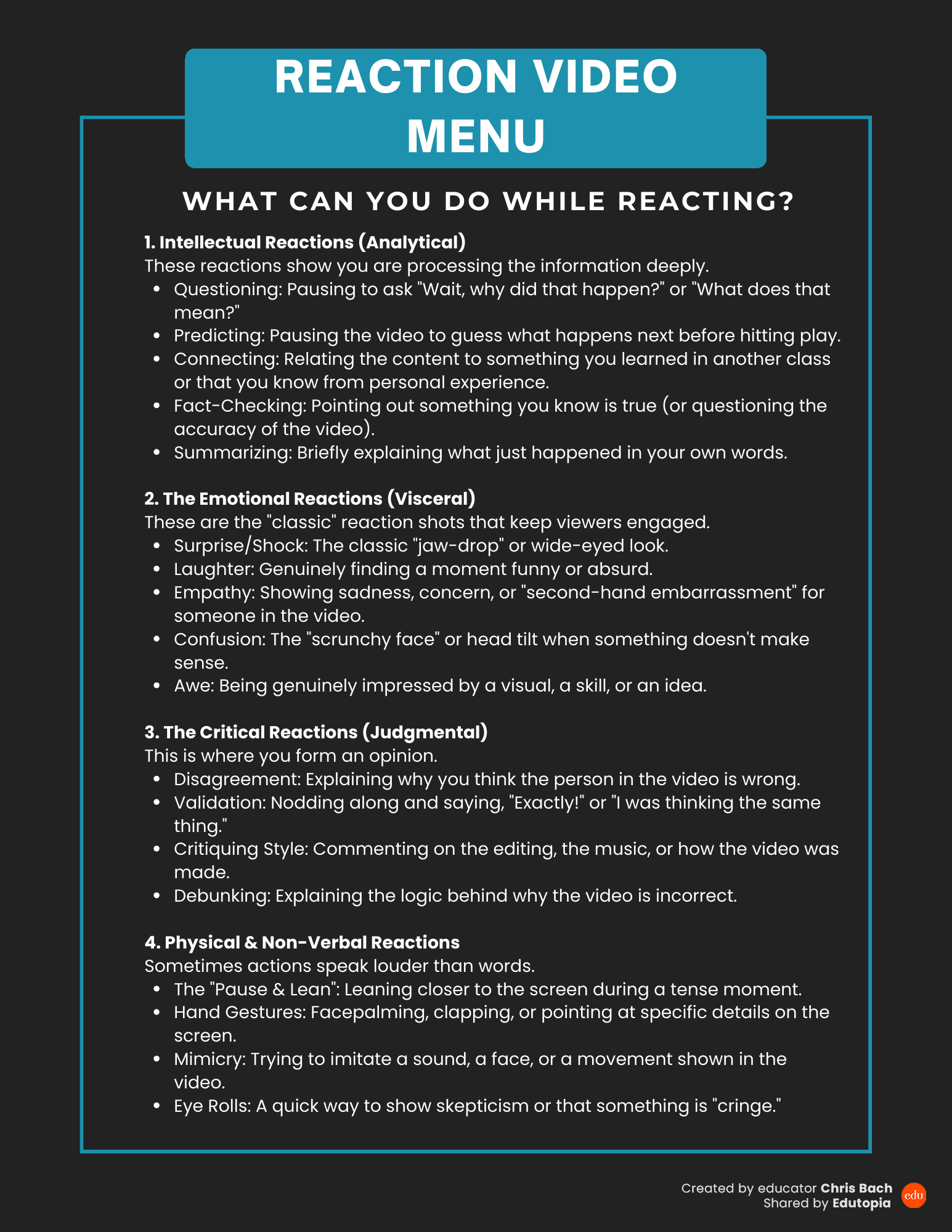
Ideas For Various Content Areas
There are many uses for reaction-style videos in different content areas. A history teacher might have students react both to primary source speeches and to dramatic video reenactments of important events. A science teacher might have students react to a video of an engaging experiment or scientific concept. An English teacher might have students react to a dramatic reading of a poem or another short text or use reaction videos as a way to introduce or reinforce annotating written texts. The possibilities are endless—and can include students reacting to other student-created videos, such as how-to or explainer videos.
The main benefit of reaction videos is that the process turns watching videos from a passive to an active experience, allowing students to share their thinking. There are no wrong or right answers. Everyone can be successful. Additionally, reaction videos situate learning in a modern format that many students are already familiar with and are much more likely to be engaged with, all while they learn content and technology skills. Over time, your students will get better at creating the videos, showing complex reactions and deeply analytical thinking.