An Effective Strategy for Teaching With Videos
Rather than showing long videos, teachers should design lessons that use clips as resources to spur class discussion.
Your content has been saved!
Go to My Saved Content.
My middle school daughter recently came home from school complaining about having to watch a 45-minute video in her social studies class. To be fair, she’s not into social studies like her dad is. Still, after a mild bout of annoyance over the video and assignment, I thought about my first year in the classroom, when I would often do the same thing. When I first started teaching, I was always tired. Always. Tired. Showing a video to my students provided me with a respite from both the drain of planning and the exhaustion of teaching.
Eventually, I began to see that extended viewing times were not engaging for my students. I came to understand that I could not simply find a video and call it a lesson. Why? Because videos are resources—not activities and certainly not lessons. Over the years, I moved from casually pressing play to effectively teaching with videos. In my current role as an instructional supervisor, teachers sometimes ask, “What’s the policy on showing videos?” My response is always, “Teach the video like text. Here’s how.”
4 Keys to Teaching Video Like a Text
1. Video clips should not be too long. In my first year of teaching, I remember finding a great documentary, scoring a ready-made worksheet online, and then playing it for the full class period. Some students followed along out of compliance for a grade. Others tried, but couldn’t keep up with simultaneously paying attention and filling out a worksheet. In my toughest classes, students were bored, and disruption ensued. Some kids just started talking to each other as if the video weren’t there at all.
Why? Because while I, as an adult, could spend a rainy Saturday tucking into a long and informative documentary about the American genocide of Indigenous people, my middle school students came to class with limited attention spans.
My first step was to start chunking video into clips, no longer than five minutes at a time.
2. Videos deserve a why. Here’s another confession. When I design learning activities—and lessons, in general—I do so with the assumption that kids are not chomping at the bit to sit in my class. Through this lens, I always prioritize relevance. In my first year, I attempted to teach the way I was taught as a child. Students were passive learners, and what Paulo Freire calls “the banking model of education” was king. In fact, reading Freire’s Pedagogy of the Oppressed in my rookie year jolted me to begin centering students in lesson design.
So, I need to know what purpose the video serves so I can ensure that students also know why we are watching. As Rebecca Alber notes, a choice clip can serve a number of essential instructional purposes. Additionally, I need a firm grasp of what thought work the class should be engaging in as we watch. Before I hit play, I always let my kids know what they should be watching for and/or thinking about as the clip plays out—Alber calls this providing the students with a mission.
3. Find a video and design the lesson. OK, now for the fun part—lesson design. My 11th graders are about to read Bettina Love’s Punished for Dreaming. I found an informative interview online where Love provides insightful context and critical background knowledge that will effectively enhance the text and learning for my kids (heads-up—there’s some colorful language in the video!).
Perhaps this should go without saying, but teachers should watch and analyze any video being shown to students before it is shown in class. Watch closely for complex concepts, vocabulary, possible misunderstandings or misconceptions, and mature themes, depending on the grade level. Be sure to time-stamp along the way. This process is akin to closely reading a text and annotating before teaching the text to the class. The video I am using is almost an hour long. I have narrowed what I need to three key time stamps.
4. Teach the video like a text. Here are the questions and prompts I designed to accompany the video. My worksheet is not a paper to be completed as students watch. It serves as a guide for thinking through writing and discussion.
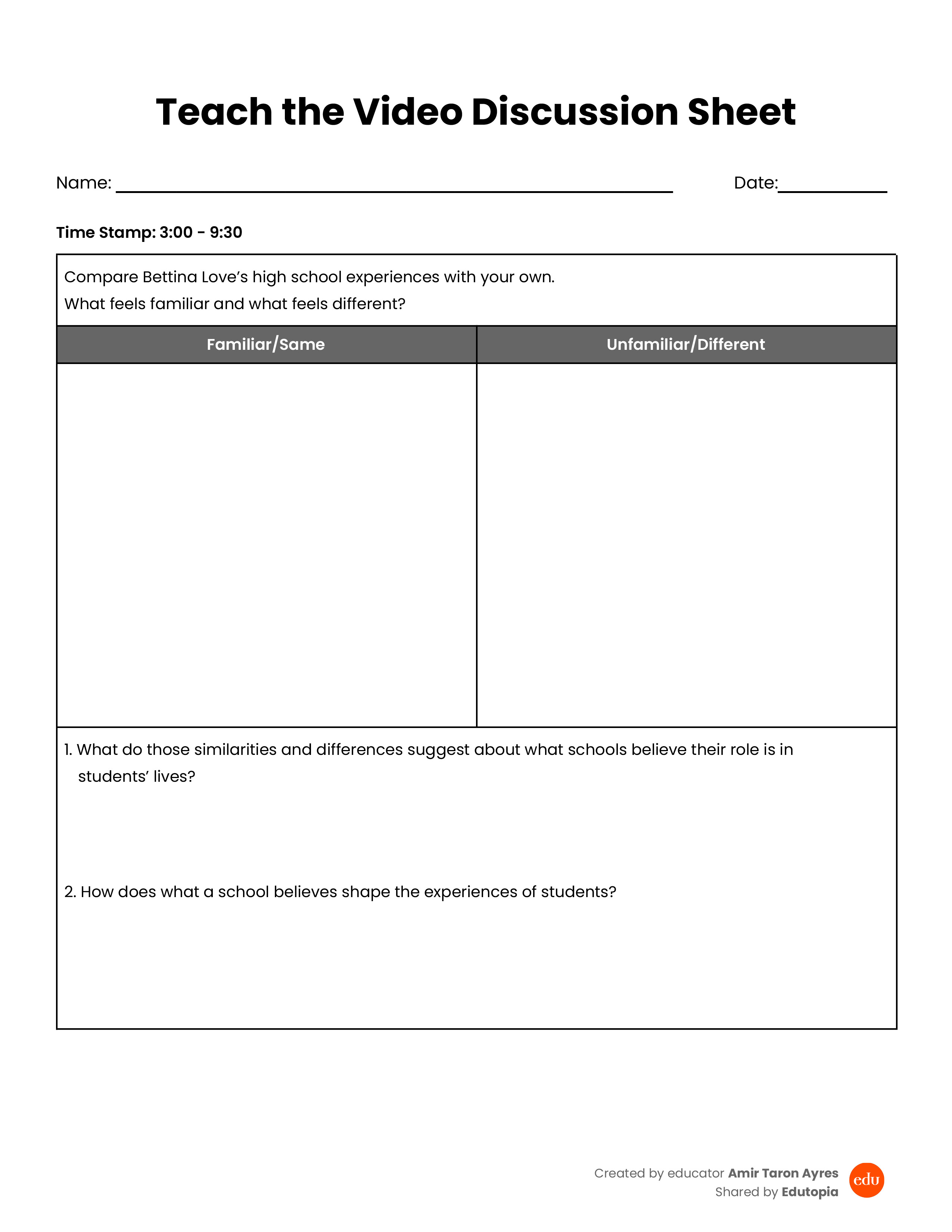
I tell the class, “As you watch this first clip, listen to Bettina Love tell her story. I want you to compare Love’s experiences in school with your own. As you are watching and listening, feel free to log your thoughts on the discussion sheet.”
Before I can press play, one of my students reminds me, “Mr. Ayres, make sure you have closed captions on.”
After the first clip, I give the class a minute and a half to finish writing down similarities and differences before prompting a one-minute turn-and-talk. I listen as students fill the room with ideas, and I prompt two warm calls before layering in my first question on top of the responses. To set these up, I intentionally move around the classroom and listen to student conversations. When I hear something thought-provoking, I prompt the student, “I want you to share this out after the turn-and-talk.” Or, “I’m going to call on you to share this.”
I frame the next clip: “As you watch, take note of what stands out to you.” I point out the vocabulary to watch for. After the second clip, we briefly discuss what stands out. This time, I ask a question that is not on the sheet, teeing up a two-minute stop-and-jot. “What do you think it means to love students while working inside a system that may harm them? Is that possible? Why or why not?”
Once I open the floor for discussion again, it’s difficult to get back to the last clip. As the class builds on one another’s thoughts, one student says, “Our school is different than the other schools that harm students.” The kids debate, and this leads me to design an assignment for our next lesson: inviting my students to complete an assessment of our school. This task will allow us to fully wrestle with this thought.
Reflecting on video as text
The video simply is a resource. The beautiful thought work our class engages in does not happen without intentional lesson design and execution. Our writing and discussion about the video provides the class with a contextual anchor, setting my students up for our reading. Students step into chapter one with foundational background knowledge on post–Brown v. Board school reform efforts, enhancing our analysis and discussion as we read.
And what about that tired first-year teacher? Honestly, I think being tired on that level is something you cannot avoid as a first-year teacher. Even the most experienced teachers face off with fatigue from the nature of the work. Taking the time to watch, analyze, and plan is not easy when you are new to teaching. But with dedication to the craft over time, you develop muscle memory and it gets easier.