Designing Typing Lessons to Teach Life Skills in Special Education Classrooms
With well-designed, intentional prompts, keyboarding instruction can help students develop several skills at once.
Your content has been saved!
Go to My Saved Content.
During typing time in my high school transition special education classroom, I noticed a pattern. My students were completing their work, but the engagement wasn’t always there. They were practicing speed and accuracy, yet the sentences they typed didn’t connect to their lives, making the activity feel routine rather than meaningful.
I wanted typing to serve a bigger purpose. My goal was not only to build keyboarding skills, but also to help students develop the life skills they need for greater independence. For students in transition programs, learning is most effective when it connects directly to real-world experiences.
To address this, I began designing typing lessons that reflect the skills my students are already working on, such as emotional regulation, community safety, and grocery shopping. When students type content that mirrors real-life situations, the activity becomes more engaging and purposeful. Instead of just completing an assignment, they are practicing skills they can apply beyond the classroom.
3 Meaningful Typing lessons
I use Typing.com to create customized, typable content based on my students’ needs. It has three main options: Typing Lessons, Typing Tests, and Written Prompts. In Typing Lessons, I can design a variety of activities, including from standard and advanced prompts as well as games. Typing Tests provide a single timed typing activity; I typically create five-minute tests for my students.
Using either Typing.com or a simple Microsoft Word document or Google Doc, teachers can create customized life-skills typing activities that are connected to real experiences. In my classroom, I start by identifying a skill that students need, such as emotional regulation skills, grocery shopping, or staying safe in the community. I break the skill into short, clear steps and turn them into simple sentences that students can type. This helps build understanding and confidence.
I organize these prompts so that they start with shorter phrases and gradually increase in difficulty. I also include key vocabulary words so that students become familiar with terms they will encounter in real life. I incorporate life-skills typing activities multiple times a week, typically three or four sessions for repeated exposure that helps them build both typing fluency and a stronger understanding.
Finally, to assess learning, I created a short typing test that summarizes the routine. I usually set the time for five minutes to measure accuracy and fluency. I also add written prompts to help students reflect and express their thoughts, connecting typing practice to communication skills.
1. Independent living skills. My students are currently working on community safety and grocery shopping skills. Here, I designed typing lessons that prioritize accuracy rather than speed, allowing students to focus on meaningful content connected to real-life skills.
For example, students type short sentences such as: “When I cross the street, I stop.” “I look for cars.” “I press the pedestrian button.” “I wait for the walk sign.”
The second set of prompts are about expanded safety instructions, where students type longer sentences explaining steps such as stopping at the curb, watching traffic, and waiting for the pedestrian signal.
I also have my students type complete paragraphs describing the process of crossing the street safely and responsible pedestrian behavior. This progression allows my students to practice typing while learning the sequence of safe pedestrian actions used in real-world environments.
Typing.com also allows teachers to create games; I designed a game where students type key vocabulary words such as crosswalk, pedestrian, traffic, signal, alert, left, right.
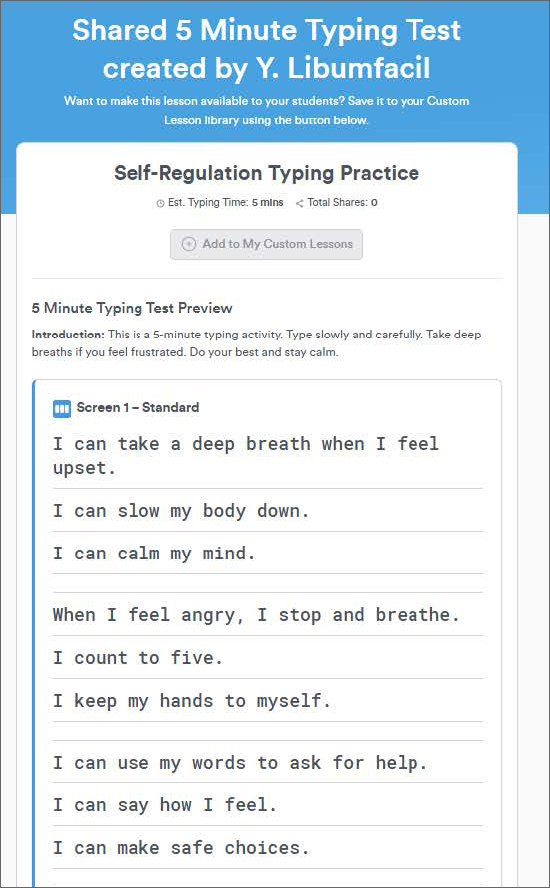
2. Social and emotional learning. To reinforce emotional regulation strategies, I created a five-minute typing test that includes reflective and coping statements. Students type sentences while practicing keyboarding accuracy and finger placement. Examples of sentences my students can type: “I can ask for help when I feel overwhelmed.” “Taking deep breaths can help me calm down.”
I also created written prompts for a daily journal activity to encourage reflection. Students type responses of at least 10 words. This activity encourages self-expression while reinforcing typing practice. In many cases, my students write their response first in a notebook and then type it into the platform, combining writing, reflection, and keyboarding practice. Journal activity prompts include: “How do you feel today?” “What is your plan today?” “How will you make good choices today?”
3. Grocery shopping. I also created a grocery shopping typing lesson. First, students type short sentences such as “Before I go grocery shopping, I make a list,” “I write milk, bread, and eggs,” and “Making a list helps me stay organized.”
The next lesson is about navigating the grocery store, where students type sentences explaining steps such as finding items in the produce, dairy, and bakery sections and placing items in the cart safely.
As with the street safety lesson, students play a vocabulary game, typing key vocabulary words such as milk, bread, eggs, apples, cereal, cheese, and chicken. They also type paragraphs explaining the full grocery shopping process, including comparing products, paying with cash or a card, and completing the shopping experience independently, reinforcing both typing skills and real-life application.
Integrating life skills into typing instruction has transformed how my students engage with keyboarding. Instead of viewing typing as a repetitive task, they begin to see it as something meaningful and useful in their daily lives. When students type sentences about real routines, making plans, or expressing their feelings, they are not just practicing a skill. They are building independence.