
How to Streamline IEP Paperwork for Special and General Education Teachers
With this simple Google Form and spreadsheet—free template included—the whole IEP team can keep up to speed on the supports students need.
Your content has been saved!
Go to My Saved Content.A middle or high school student may rotate through seven classes a day, each with different expectations, routines, and demands. In many ways, they live seven different academic lives inside one school building. For students with individualized education programs (IEPs), how they navigate those shifting demands can mean the difference between steady progress and daily frustration.
In the traditional process, this often means the special education teacher spends weeks chasing down updates, combining emails and notes into progress reports, and trying to reconstruct patterns after the fact to help the student. Typically, guardians are the only ones who see those trends once reports are finalized. Then, meetings must be scheduled for teachers to align supports, which adds paperwork, time away from instruction, and delays in supporting the student.
As co-teachers supporting those students, we felt that challenge from two sides: As a special education case manager, Carolyn might see a student only briefly, if at all, but still be responsible for tracking their IEP goals across all subjects. Without a shared system, that was like trying to understand a mosaic through a keyhole. And as a general education teacher, Cathleen might sense when something wasn’t clicking for a student but not know whether the issue was happening elsewhere. Was it a missing accommodation? A skill gap? Another teacher might have already solved the puzzle, but we had no way to see each other’s insights.
We needed a way for every teacher to see the same student, at the same time, in the same way—but in secondary schools, information sometimes moves fast… and sometimes not at all.
Progress reports are required, but gathering accurate information can be exhausting—tracking down teachers, collecting examples, and piecing together partial stories. We also needed real-time visibility into IEP goals, not just grades, because so many goals show up across multiple classes.
So we started using a simple Google Form that outputs to a spreadsheet that everyone on the IEP team can see. Not because we love forms—because we love clarity.
The form created a single shared space where general and special education teachers can upload data at any time, not just during progress-report season. Teachers can drop in observations, attach work samples, note strategies, and record goal progress the moment they see it.
This simple system has become a yearlong collaboration tool. Special education teachers don’t have to carry the entire onus of data collection—gen ed teachers can see what’s happening across a student’s day. IEP teams can identify trends early and adjust supports immediately.
Here’s how this simple tool transformed our work and our students’ outcomes—and how it can work for you too.
1. It Makes Invisible Patterns Visible
When seven teachers each hold one piece of a student’s story, no one has the whole picture. The shared spreadsheet changes that.
We launched the system by creating one form for each student, adding their personal IEP goals, and sharing the live spreadsheet with the whole IEP team and families by entering their email addresses and granting them viewer-only access. Using scheduled future send, the form is automatically emailed to teachers once each quarter, and they bookmark it for ongoing use. They can update it any time, without waiting for the quarterly reminder. We spent five minutes walking the team through the process of using the form, and we updated guardians, and then real-time data began flowing immediately.
You can see the form below. Note: After you click “Make a copy” on the first screen, please click “Restore” in the pop-up that says “Missing File Upload folders.”
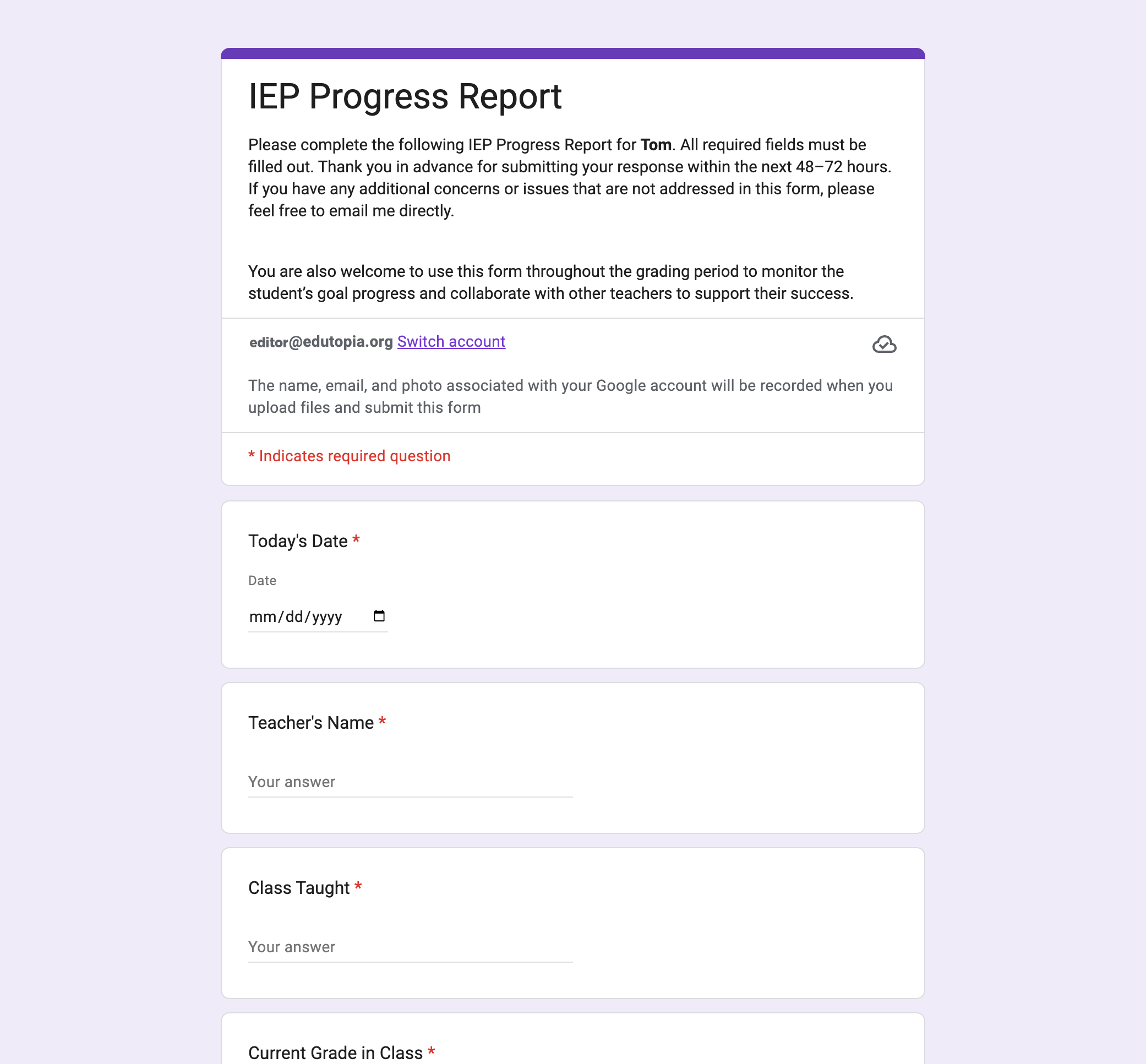
Teachers submit a 60-second snapshot via the bookmarked Google Form whenever they notice a shift. No extra log-ins, no copies needed, no juggling multiple pieces of paperwork. Once teachers began submitting updates through the form, patterns emerged almost instantly:
- A student unfocused in English but thriving in science because of visual cues.
- A student shutting down in math but succeeding in art, thanks to structured peer support.
- A student forgetting materials in history but never in PE, due to a consistent routine.
These trends matter. They help us distinguish between content struggles and environmental mismatches. They reveal strengths that may be hidden in academic courses. And they highlight where engagement is working and why.
The moment a pattern becomes visible, the support becomes intentional. And when every teacher sees the pattern, successful strategies stop being classroom secrets and start becoming shared practice.
2. It Creates a Real-Time Feedback Loop (Not a 9-Week Loop)
IEP goals shouldn’t just be filed away—they should guide instruction daily. But in secondary schools, teachers rarely have time for lengthy updates or frequent meetings.
The Google Form solves that. A teacher submits an update in two minutes, tops. The case manager sees the data immediately. The gen ed team can adjust instruction starting that same day. Students get targeted support in real time, not weeks later.
This feedback loop created something unexpected: trust. Teachers started reaching out earlier, conversations became proactive instead of reactive, and we stopped waiting for progress reports and started teaching to the data as it came in.
3. It Builds a Shared Responsibility Culture
Special education support works best when the entire team participates, not when data lives with one person. The chart democratizes insight:
- The case manager no longer has to chase updates.
- Gen ed teachers can see what’s working in other classrooms.
- Counselors and specialists can spot patterns in seconds.
- Everyone can borrow strategies that help students succeed.
As consistency grows across classes, students experience school as a coordinated support system, not fragmented pockets of help. Shared responsibility reduces stress for teachers and creates a more stable, predictable experience for students.
A Real IEP Meeting Transformed by the Chart
Perhaps the most powerful moment, for us, came during an IEP meeting. Before we had the spreadsheet, these meetings often relied on anecdotes and memory. Teachers shared what they could recall, grades were reviewed, and the team worked together to construct the best narrative possible.
These meetings were different this year. We opened the spreadsheet on the screen, and instead of fragments, we had a complete, time-stamped record of the student’s progress across all classes. For example, one ninth grader with reading goals struggled most in English but excelled in history, and the chart revealed why: The history teacher consistently used visual previews and structured cues that were directly aligned to the student’s IEP. Once the English teacher began using the same structure, the student completed the next assignment with confidence and said, “This makes sense now.”
Small Tool, Big Impact
The Google Form began as a basic organizational tool. It became a communication system, then a shared instructional language, and finally a catalyst for collective action. In a secondary school where no single teacher sees the full picture of a student, this clarity provided the support we needed to support students effectively and compassionately.
It helped us see students as full, complex learners with strengths, needs, and tremendous potential. And when we see clearly, we teach better. When we collaborate, students thrive. And when a simple system becomes a shared habit, it changes everything around it.