What Is Successful Technology Integration?
Well-integrated use of technology resources by thoroughly trained teachers makes twenty-first-century learning possible.
Your content has been saved!
Go to My Saved Content.Technology integration is the use of technology resources -- computers, mobile devices like smartphones and tablets, digital cameras, social media platforms and networks, software applications, the Internet, etc. -- in daily classroom practices, and in the management of a school. Successful technology integration is achieved when the use of technology is:
- Routine and transparent
- Accessible and readily available for the task at hand
- Supporting the curricular goals, and helping the students to effectively reach their goals
When technology integration is at its best, a child or a teacher doesn't stop to think that he or she is using a technology tool -- it is second nature. And students are often more actively engaged in projects when technology tools are a seamless part of the learning process.
Defining Technology Integration
Before we can discuss how to shift our pedagogy or the role of the teacher in a classroom that is integrating technology, it is important to first define what "technology integration" actually means. Seamless integration is when students are not only using technology daily, but have access to a variety of tools that match the task at hand and provide them the opportunity to build a deeper understanding of content. But how we define technology integration can also depend on the kinds of technology available, how much access one has to technology, and who is using the technology. For instance, in a classroom with only an interactive whiteboard and one computer, learning is likely to remain teacher-centric, and integration will revolve around teacher needs, not necessarily student needs. Still, there are ways to implement even an interactive whiteboard to make it a tool for your students.
Willingness to embrace change is also a major requirement for successful technology integration. Technology is continuously, and rapidly, evolving. It is an ongoing process and demands continual learning.
When effectively integrated into the curriculum, technology tools can extend learning in powerful ways. These tools can provide students and teachers with:
- Access to up-to-date, primary source material
- Methods of collecting/recording data
- Ways to collaborate with students, teachers, and experts around the world
- Opportunities for expressing understanding via multimedia
- Learning that is relevant and assessment that is authentic
- Training for publishing and presenting their new knowledge
Types of Technology Integration
It is sometimes difficult to describe how technology can impact learning because the term "technology integration" is such a broad umbrella that covers so many varied tools and practices; there are many ways technology can become an integral part of the learning process. Just a few of these ways are listed below -- but new technology tools and ideas emerge daily.
Online Learning and Blended Classrooms
While K-12 online learning gains traction around the world (visit our Schools That Work package about online learning), many teachers are also exploring blended learning -- a combination of both online and face-to-face education. Read a blog by Heather Wolpert-Gawron about blended learning. Blogger Bob Lenz also gives us a snapshot of what blended learning looks like in the classroom.
Project-Based Activities Incorporating Technology
Many of the most rigorous projects are infused with technology from start to finish. Visit our Schools That Work package about project-based learning in Maine to read about a middle school and high school that are getting excellent results from mixing PBL with a one-to-one laptop program. Or read a recent blog by Brian Greenberg about combining PBL with blended learning.
Game-Based Learning and Assessment
There has been a lot of buzz about the benefits of incorporating simulations and game-based learning activities into classroom instruction. Visit our Video Games for Learning Resource Roundup page to learn more. Guest blogger Terrell Heick wrote about the gamification of education, or go straight for the practical resource and read Andrew Miller's "Game-Based Learning Units for the Everyday Teacher".
Learning with Mobile and Handheld Devices
Once widely dismissed as distractions, devices like cell phones, mp3 players, and tablet computers are now being used as learning tools in forward-thinking schools. Check out our downloadable guide, Mobile Devices in the Classroom. Read a blog by Ben Johnson on using iPads in the classroom or an article about using cell phones for educational purposes. Check out the case study by former Edutopia executive director Milton Chen on using iPods to teach English language learners, or there's a blog by Audrey Watter about texting in the classroom. We also have a blog series that maps k-5 iPad apps to Bloom's taxonomy by Diane Darrow. You will many more links on our Mobile Learning Resource Roundup page.
Instructional Tools like Interactive Whiteboards and Student Response Systems
In many schools, the days of green chalkboards are over. Read an article about how to put an interactive whiteboard to best use, or one with tips from a teacher about her favorite ways to use her whiteboard. Read an article about using classroom response systems for interactive assessment and watch a video where a student-reponse system is used in a classroom.
Web-Based Projects, Explorations, and Research
One of the first, and most basic, ways that teachers encouraged kids to use technology was with online research, virtual field trips, and webquests. Watch videos about online collaborative projects Journey North and the JASON project. Read an article by Suzie Boss about using web-based resources to help your classroom go global, and here's an article with links to wonderful virtual field trips. Or check out these useful how-to articles about using online photo archives for primary sources, teaching with virtual libraries, and helping students do research on the web.
Student-Created Media like Podcasts, Videos, or Slideshows
One of the central ideas of digital or media literacy is that students should be come creators and critics, not just consumers, of media. Read an article about student-produced podcasts, or find out more about quality digital storytelling in a blog by Suzie Boss. You can also watch a video about students learning how to become creators in Chicago at Digital Youth Network. Or learn about student filmmakers in the San Francisco Bay Area, San Antonio, Texas, or Effingham, Illinois.
Collaborative Online Tools like Wikis or Google Docs
Connecting with others online can be a powerful experience, both for teachers and for students. Teacher Vicki Davis is an evangelist for such connections; watch a video about technology in her classroom or read an article she wrote for Edutopia on creating personal learning networks for students. Read an article about the basics of how wikis work, and blogger Audrey Watters makes the case for why wikis still matter. You can also read more about Google's free offerings for educators.
Using Social Media to Engage Students
Though social media tools are still blocked in many schools, students around the world spend vast amounts of time on social networks outside of school. Read a blog that makes the case for social media in education, and article that goes over how to use social-networking technology for learning, or another blog about how to co-opt students’ favorite social media tools for classroom use. You will find lots of tips and hints in our primer, "How to Create Social Media Guidelines for Your School."
Frameworks for Technology Integration
Two commonly used models for technology integration are known as SAMR and TPACK.
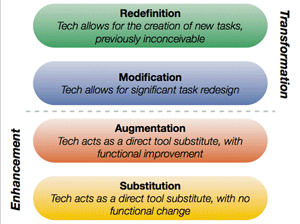
The SAMR (Substitution, Augmentation, Modification, Redefinition) model, created by Dr. Ruben Puentudura, guides the process of reflecting on how we are integrating technology into our classrooms. The ultimate goal of technology integration is to completely redefine how we teach and learn, and to do things that we never could before the technology was in our hands. For more information, you can watch a series of podcasts by Dr. Puentudura, visit his blog, or read Dr. Puentudura's paper on the model (PDF).
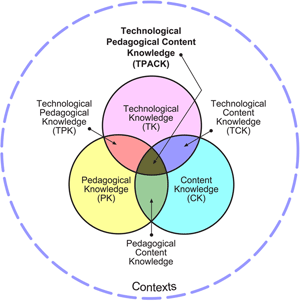
The TPACK (Technological Pedagogical Content Knowledge) framework lays out the knowledge that educators need in order to successfully integrate technology into their teaching. The TPACK website provides a large collection of free resources for teachers and other instructional leaders.
Levels of Technology Integration
In her blog, "What Does 'Technology Integration' Mean?" Mary Beth Hertz shares four levels of classroom technology integration she has observed in schools:
- Sparse: Technology is rarely used or available. Students rarely use technology to complete assignments or projects.
- Basic:Technology is used or available occasionally/often in a lab rather than the classroom. Students are comfortable with one or two tools and sometimes use these tools to create projects that show understanding of content.
- Comfortable:Technology is used in the classroom on a fairly regular basis. Students are comfortable with a variety of tools and often use these tools to create projects that show understanding of content.
- Seamless:Students employ technology daily in the classroom using a variety of tools to complete assignments and create projects that show a deep understanding of content.
Despite the dramatic differences in resources and abilities from classroom to classroom, school to school, and district to district, it's possible to integrate technology tools in ways that can impact engagement and learning for all students. And if, like many teachers, you have obstacles in terms of available equipment or support, we've got two great resources: Suzie Boss's article, "Overcoming Technology Barriers: How to Innovate Without Extra Money or Support," and Mary Beth Hertz's blog, "Integrating Technology with Limited Resources."
Continue to the next section of the guide, How to Integrate Technology Tools, where you will find many more tips for successful technology integration.