Board of Education: A Wall-Mounted Computer Monitor for Your Classroom
A top teacher shares her enthusiasm for -- and tips about using -- interactive whiteboards.
by Douglas Cruickshank

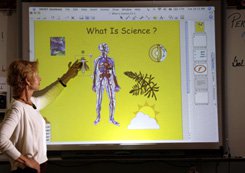
Teacher Sue Holland and her beloved interactive whiteboard.
Credit: Elena Dorfman
No doubt some twisted souls will miss the occasional nerve-fraying shriek of chalk on a blackboard. For the rest of us, the growing popularity of interactive whiteboards -- often mistakenly lumped under the label "smart boards," although Smart is a specific brand name -- are one of the best things to happen to classroom technology in the last twenty years.
An interactive whiteboard is essentially just a large, touch-sensitive screen. The board is connected, via a standard USB plug, to a computer and a digital projector, which displays the computer's screen image onto the whiteboard. Software enables the computer to be controlled from the whiteboard by a hand or by special pens. Work done on the board can be saved on the computer and emailed, which, over the course of the school year, can mean a significant reduction in paper handouts.
Click here for green educational resources
Related Green Articles:
Creature Features:
Critters for the classroom. Read MoreGreen Cleaning:
Harmful products can bite the dust. Read More
Not surprisingly, the business world quickly took a shine to interactive whiteboards when they were introduced in 1991. Now, educators are beginning to discover what the business community is raving about.
In a July posting on Edutopia.org, elementary school teacher Susan Parker wrote that her classroom's interactive whiteboard "brings the information alive" to the students. She noted that "each lesson becomes an interactive one, and students are very motivated to learn."
"The board is very useful to demonstrate and teach editing and rewriting," says Parker, who works in an inner city school with many bilingual students. "There are pens in different colors that allow you to write directly into the Word document you're using and save the editing marks, which is extremely helpful."
One of the board's benefits, Parker adds, is that all students can easily see the images, enabling the lesson to become an engaging group activity. "Instead of crowding around little monitors, the students take turns interacting with the computer," she says. "They also get support from each other. The teacher can use it to demonstrate, then the students can use it to practice, but without feeling like they're put on the spot." Parker uses the interactive whiteboard in class daily, often in conjunction with the Internet, she adds, "in all subjects: reading, literacy, math, writing, science, geography, and social studies."
The companies that make and install interactive whiteboards usually offer tutorials on their Web sites, or provide onsite training for a fee. But most educators agree that they're easy to learn, and simple to operate. Becoming tech savvy has rarely been this easy.
This article was also published in the October 2007 issue of Edutopia magazine.
Advertisement


Comments & Responses
How Are They Being Used
Now that smart boards are such a common place in American classrooms, we can begin asking how they are being used. Do we really want twenty students watching as two students interact with the computer? There should be some creative ways of getting all students thinking and interacting most of the time.
Interactive Whiteboards
I'd like to know more about how to build the Johnny Lee Chung interactive whiteboard mentioned above. I think the SMART boards are a great innovation (still using overhead projector and dry erase boards here) but they cannot be effective if a school does not have them installed in every room. We currently share 3 boards on mobile carts for a 16 room high school--I do not use them because I can't guarantee that they'll be available when I need them. The end result is "finders-keepers" and "possession is 9/10ths of the Law" when it comes to technology. I will admit that I have sole possession of the oldest LCD projector, as I am the only one who can consistently make it work (and am willing to endure its foibles, like intermittent contact with my Macintosh!).
I sometimes think that people outside education imagine that teachers' access to technology is similar to the business world -- this discussion is proof positive that we, as educators, often get short shrift when it comes to technology. I'm still hostage to the copy machine which breaks down just before I need to copy a major handout for my kids.
Jim Boyer
Hitachi has already made a
Hitachi has already made a multi-touch whiteboard its called the FX 77 Duo and is about the same price or cheaper than the board in this article.
Interactive Whiteboards
My co-teacher and I LOVE our SmartBoard! In our 5th grade inclusion class we use the board to differentiate instruction for all of our learners. We create interactive lessons for students using the Smartboard notebook tools. We also hyperlink pages to movies in BrainPop and United Streaming. Some of our favorite and most productive lessons involve playing games on various educational internet sites. Students love visiting sites such as mathplayground.com. Did you also know that you can upload the notebook files to your class website as pdfs? Another exciting function is the ability to record your actions on the SmartBoard and you can include voice-overs. We can upload these files to our website too. I think the possibilities are endless when it comes to utilizing interactive whiteboards. Teachers just need to recognize the potential and they can't be afraid to take their teaching to the next level.
High School English
Once you have had an interactic whiteboard, you will not be satisfied with anything else - - you can show artwork on a grand scale, go to websites that have wonderful interactive materials,etc. (Marco Polo alone will make your investment worth 10 times what you pay for it.) You can annotate and highlight text that students can see from the back of the room, you can shape paragraphs to show main ideas, cause-and-effect- -I could go on and on forever. The really mind-blowing effect, however, is the way the kids really respond to the board - seeing their writing in bright colors, moving pieces of puzzles, playing Jeopardy with review questions, writing with digital ink. I am not a gadet person in any way and this is definitely NOT a gadget. An interactive white board is a wonderful tool to make teaching so much more interesting and learning "cool" beyond words. Until you work with one, it is impossible to truly understand what a wonderful tool teachers have been given. Student engagement is the magic in learning and an interactive white board makes that happen in a BIG, BIG way.
Don't bother with this outdated technology
This tool is going the way of the buffalo. It's based on the ages-old point and click paradigm which will be eclipsed by the new multi-touch interface popularized by Jeff Hann (http://www.ted.com/index.php/talks/view/id/65) and Apple (http://www.apple.com/ipodtouch/).
Nineteen Ninety One. Educators are enamored with a tool that is at least 15 years old. Granted we still use pencil and paper, but those don't cost us thousands of dollars to install and maintain.
Bell invented the telephone
Bell invented the telephone in 1876, but it wasn't until 2001 that I got a telephone in my classroom, which happened to be in a large urban public school system. At that rate, Hahn's cutting edge technology will appear in my classroom by the year 2132. So, in 2003, when my district put a 15-year-old technology in my classroom, i.e., Smartboard, I didn't reject the notion. In fact, I call that progress--it only took 15 years to catch up with interactive white boards, instead of the 125 years it took for our school to get telephones.
Public educators can't afford to be naysayers when it comes to technology. At the same time, we can't let the latest technology craze sweep our dollars out the door. A little test-of-time proves which technologies are cost-effective to bring to the masses and are truly worthwhile investmests.
Pace of tech acquisition in education
Remember that it took 10 years for overhead projectors to become common in classrooms. LCD projectors took almost 15 years to get to their current level of inclusion. Yes, interactive whiteboards are finally becoming more common in classroom. That is a GREAT thing! Muti-touch will find its way to educators in 10 or 15 years, too.
"Just another toy"
I agree that the multi-touch interface will make it into the classroom sometime (Neiman-Marcus is advertising one for "only" $100,000).
I just recall ten years ago after seeing my first interactive white board and thinking this will change the way we teach. I was in a budget meeting and suggested that we invest in one. When asked to explain what it was I was cut off by the school's principal who said "Oh, it is just one of Bruce's toys." Ten years later different school, different principal I am still waiting to have one installed- although it should be before the end of the month. Maybe your institution can afford to wait... but there are still schools out there with chalk boards. If we funded education properly we could sit around and scoff at this "old technology" but unfortunately most classroom teachers are happy just to have reliable Internet, access to a phone, and a functioning VCR.
So you think that multi
So you think that multi touch wont cost thousands of dollars then.
I guess I should throw away my DVD player right now and buy a blu-ray or HD DVD player too should I. What you have to realise is that the education world moves slowly, it will be another 15 years till the multi touch will have penetrated to education system, then you'll be asking us why we like it so much when theres mind control boards!
Post new comment