Technology Integration Subscribe to RSS
Five Reasons I Love Using QR Codes in My Classroom
January 23, 2013 | Monica BurnsThere are so many tools that educators can use to get students interested and engaged in their work. Like most teachers today, I integrate technology into my instruction everyday. I'm lucky to work in a school with one-to-one technology and use iPads with my students throughout every school day. That makes it easy to use QR codes in my classroom -- and there are many reasons I love using QR codes!
What is a QR Code?
A Quick Response Code is a digital image that can be scanned without the beam of light needed to scan barcodes at the supermarket. It's used in advertising and marketing for smartphone users. You may have seen QR codes on flyers, subway posters, brochures and even cereal boxes. They are often accompanied with a message that says, "For more information scan this code." They can be scanned using one of the many free QR scanner apps available for smartphones and tablets. When you scan the code, you'll be taken directly to a website.
What does this marketing tool have to do with education? If I want all of my students to visit one website, I'll create a QR code for that website. And that's only one of the benefits.
Credit: Monica Burns
How QR Codes Can Make a Difference in the Classroom
1. Eliminate the Frustration of Long Web Addresses
Instead of asking students to type in a long web address where they could easily make mistakes, a QR code will take them straight to a website. It's easy to type in USAToday.com, but directing students to a specific article might require them to type in a combination of case sensitive letters and numbers. QR codes are perfect for students of all ages, but especially for children with special needs and those students who are easily frustrated.
2. Take Students Directly to a Designated Website
We all want to avoid using search engines that might bring our students to the wrong website. This direct approach also limits their exposure to similar sites that might not be kid-friendly. You can create a list of QR codes for websites to make Internet research easier for students.
3. Save Time
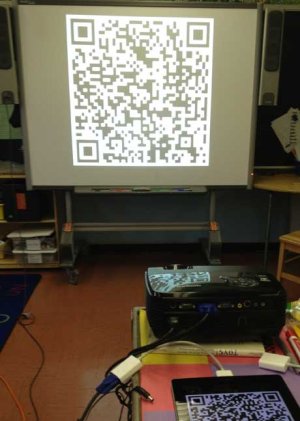
Instead of waiting for each student to type in a long web address, they can all quickly scan the QR code. You won't have to waste valuable minutes from your lesson because all students will be on task and viewing the correct website in seconds. Try projecting the QR code on the board or printing just one QR code for each table of students to save yourself the time of making extra copies.
4. QR Codes are Easy to Make
Websites like Qurify.com allow you to generate your own QR code for free. Copy and paste a long web address, and they’ll create a code that is unique to that particular website. You can save, print and distribute the QR code to students.
5. Change Up Your Normal Routine
I love to keep things new and exciting for my students. Try creating scavenger hunts that will get your students to visit a variety of websites to gather information on a topic. Get students engaged and moving by placing QR codes in different parts of your classroom or school building.
Are you already using QR codes in your classroom? I'd love to hear how you're integrating this technology tool into your instruction.


Comments (35)
Comment RSSSign in or register to post comments
Didn't realize how great QR
Didn't realize how great QR codes are in the classroom until I went to a middle school conference 3 weeks ago. I had an opportunity to attend a session about QR codes. In the session, the teacher gave us several suggestions on how to incorporate them. One suggestion she gave was for the elementary level. As they are reading through a picture book she tapes QR codes throughout the book. When they get to that page, they scan their QR code and it takes them to a game or video that elaborates more on that idea. She also talked how the art teacher used them. The students created these 3D sculptures and one night she invited the parents to come in for a showing. One parents went to a sculpture, there was a QR code attached. When they scanned the QR code, it was linked to a video of the student describing their art project. The parents just loved it! I am hoping to incorporate this idea in a couple weeks with our science fair project. Students will be completing a science experiment and going through the steps of the scientific method. Instead of making a tri-fold board or poster, my students will be creating a video explain the steps they went through, their hypothesis, results, etc. The parents will be able to link to the video through a QR code. We have a set of iPod's available at our school which will be helpful for those parents that do not have a smartphone. Great article though! I am glad that we are finding new and creative ways to use technology in our classrooms. Our students love it!
Thank you to AL Tucker! I did
Thank you to AL Tucker! I did a little scrolling through previous blog posts, and saw that he already answered a similar question I had for someone else. FYI: the program he linked @ http://dansl.net/qrreader/ definitely does work for anyone running MAC OS 10.6. Now I am ready to start printing my QR labels and having fun in my classroom!
Success with Macbook?
Hi Everyone! This concept is amazing!! I have played with these little QR codes on my iphone in magazines, at dept stores etc..., and I had heard rumors they were being used in classrooms. I just never knew how until now. The idea of linking lengthy URLs to a QR code is great. I teach 3rd grade, and typing these is always a challenge. I typically have to work ahead and drop hyperlinks on classroom webpages, but that can't always be done. The Macbooks I use in my classroom are equipped with isight cameras, so this is possible for me. Can anyone recommend a good app that has a proven track record with that type of machine? Thanks!
Thank you, Kim!
Aww thank you, Kim for the kind shout-out! I DO love QR codes & have created QR Code Scavenger Hunt Lesson Plans & Comic Tutorials (Hint: Google Daring Comic QR Code Tutorial to find more! ) But I love LOVE these ideas, too!
Power to the QR! Cheers!
~Gwyneth Jones
The Daring Librarian
You can also use them with
You can also use them with computers (laptops usually) that are equipped with a web cam. Use this free application to get a laptop to read a QR code: http://dansl.net/qrreader/ Here is a great video of a child demonstrating how it works: http://youtu.be/hSA3YsBy_pU
mrshoward118
Thank you for your ideas for QR Codes. I'm crazy about their potential in the classroom! Here's my recent blog post about ways to make them more dynamic and colorful!! http://www.yoursmarticles.blogspot.com
Yes, you can have students
Yes, you can have students use a computer to scan a QR code. I have examples and resources that I shared in this presentation for Classroom 2.0 LIVE - http://live.classroom20.com/1/post/2012/02/qr-codes-in-the-classroom.html along with my Slideshare.net presentation http://www.slideshare.net/kcaise/innovative-ways-to-use-qr-codes-in-clas.... Gwyneth Jones is also a great resource for using QR codes on her campus. She is a librarian and is also known as 'The Daring LIbrarian and has a great blog featuring the ways she QR codes: http://www.thedaringlibrarian.com/.
Kim Caise, NBCT, M.Ed.
Classroom 2.0 LIVE Co-Host
http://kimcaise.com
Yes it can
Do you know if iPads come with a QR code reader? If not, what readers do you recommend for iPads and most prevalent BYOD?
Of course it can.
i-nigma is an excellent free app for both ipad or iphone.
https://itunes.apple.com/en/app/i-nigma-qr-code-data-matrix/id388923203?...
Of course it can. i-nigma is
Of course it can.
i-nigma is an excellent free app for both ipad or iphone.
https://itunes.apple.com/en/app/i-nigma-qr-code-data-matrix/id388923203?...
QR Readers-- iPads come equipped or do you download/install
Do you know if iPads come with a QR code reader? If not, what readers do you recommend for iPads and most prevalent BYOD?