Technology Integration Subscribe to RSS
Five Reasons I Love Using QR Codes in My Classroom
January 23, 2013 | Monica BurnsThere are so many tools that educators can use to get students interested and engaged in their work. Like most teachers today, I integrate technology into my instruction everyday. I'm lucky to work in a school with one-to-one technology and use iPads with my students throughout every school day. That makes it easy to use QR codes in my classroom -- and there are many reasons I love using QR codes!
What is a QR Code?
A Quick Response Code is a digital image that can be scanned without the beam of light needed to scan barcodes at the supermarket. It's used in advertising and marketing for smartphone users. You may have seen QR codes on flyers, subway posters, brochures and even cereal boxes. They are often accompanied with a message that says, "For more information scan this code." They can be scanned using one of the many free QR scanner apps available for smartphones and tablets. When you scan the code, you'll be taken directly to a website.
What does this marketing tool have to do with education? If I want all of my students to visit one website, I'll create a QR code for that website. And that's only one of the benefits.
Credit: Monica Burns
How QR Codes Can Make a Difference in the Classroom
1. Eliminate the Frustration of Long Web Addresses
Instead of asking students to type in a long web address where they could easily make mistakes, a QR code will take them straight to a website. It's easy to type in USAToday.com, but directing students to a specific article might require them to type in a combination of case sensitive letters and numbers. QR codes are perfect for students of all ages, but especially for children with special needs and those students who are easily frustrated.
2. Take Students Directly to a Designated Website
We all want to avoid using search engines that might bring our students to the wrong website. This direct approach also limits their exposure to similar sites that might not be kid-friendly. You can create a list of QR codes for websites to make Internet research easier for students.
3. Save Time
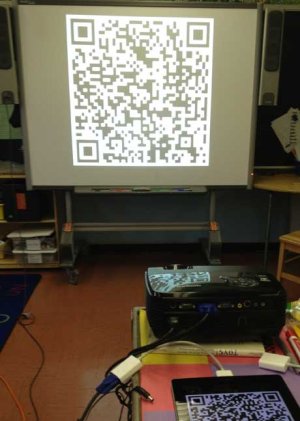
Instead of waiting for each student to type in a long web address, they can all quickly scan the QR code. You won't have to waste valuable minutes from your lesson because all students will be on task and viewing the correct website in seconds. Try projecting the QR code on the board or printing just one QR code for each table of students to save yourself the time of making extra copies.
4. QR Codes are Easy to Make
Websites like Qurify.com allow you to generate your own QR code for free. Copy and paste a long web address, and they’ll create a code that is unique to that particular website. You can save, print and distribute the QR code to students.
5. Change Up Your Normal Routine
I love to keep things new and exciting for my students. Try creating scavenger hunts that will get your students to visit a variety of websites to gather information on a topic. Get students engaged and moving by placing QR codes in different parts of your classroom or school building.
Are you already using QR codes in your classroom? I'd love to hear how you're integrating this technology tool into your instruction.


Comments (35)
Comment RSSSign in or register to post comments
That's fantastic! I've seen
That's fantastic! I've seen them use to tour school gardens too!
One of our teachers, Gina Fraher, used QR codes during Meet the Teacher Night. Students and families used iPads to explore the classroom and learn about the fabulous learning that will take place in their class and what to expect. Such an awesome idea for students and families to get familiar with their environment and the teacher! It started the year with positive expectations, and helped build great relationships.
Great point Josh!
Great point Josh!
Great idea!
Great idea! I know what I'll be doing this summer.
Great idea! I know what I'll
Great idea! I know what I'll be doing this summer.
I was speaking about this
I was speaking about this with a guy on Twitter, and we noted that if you're flipping your classroom, or using something like Moodle to post most of your classwork, then QR codes become less useful. However, if you're not doing those things, and need to get batches of web information to your students via paper, then you're good to go with the QR codes.
Well, I would say that one
Well, I would say that one limitation is that in order to use them, you have to have them point to somewhere, and that involves having the material hosted on a website. Whether it is audio or visual, the code has to point somewhere. And there are lots of places that offer free hosting for websites, but when you're talking about hosting audio files, or large amounts of photographs, that space can get eaten up pretty quickly. Therefore, I think long before someone considers QR codes you've got to think of how you're going to host the portfolios or video or audio files. Once that's done, you're set.
QR at Meet the Teacher
One of our teachers, Gina Fraher, used QR codes during Meet the Teacher Night. Students and families used iPads to explore the classroom and learn about the fabulous learning that will take place in their class and what to expect. Such an awesome idea for students and families to get familiar with their environment and the teacher! It started the year with positive expectations, and helped build great relationships.
Students use them too!
Thanks for sharing. I am a huge fan of QR codes.
Here's another way I like to use them--and in this case, the students create the codes: QR codes are a great way to get evidence your students' knowledge on a topic of study. An added bonus is that the students then use the QR codes the same way they are used professionally on posters, brochures, and postcards: some information is easily transmitted via print media, but other information, such as audio files, or the content of a related Web site cannot be part of a paper document. As a result, QR codes are used professionally (and by my students) along with printed information to provide dynamic access to a more diverse and rich array of related information. So, I have my students do projects (in French) in which they create a flyer that presents some of the needed information in writing, but has links to other content they have created online and/or audio of them speaking and these other components of their work are connected to QR codes that they put on the brochure or flyer. The information in the QR codes does not repeat the information provided in writing--the point is to use the medium that is the best for the information students wish to convey, thereby also teaching and practicing media literacy.
QR codes link to book trailers
We post QR codes on the covers of books to get potential readers to watch the trailer before they choose the title. As our students create their own trailers, they are responsible to also generate the code to put on the front to promote both their digital book preview as well as the book itself.
This year we are
This year we are incorporating QR codes into our yearbook so the students can go back and see video clips of events throughout the school year.