Technology Integration Subscribe to RSS
Doing Internet Research at the Elementary Level
January 13, 2012 | Mary Beth HertzOne of the hardest things to teach, in my opinion, is research. I have been teaching in a computer lab for going on five years and I have never taught research the same way twice. This is partially because I never teach anything the same way twice, but it's also because each year I learn something new. Sometimes I learn the hard way when things don't pan out the way I planned in the classroom, sometimes I learn because something I didn't plan arose and worked out well, and sometimes its due to my own self-education as I prepare to teach my annual research unit.
I begin teaching research skills in third grade -- just at the time where my students' reading skills are such that they can feel successful and just at the time when they have mounds and mounds of natural curiosity. In the past, I have done your typical find-information-and-regurgitate-it-to-me kinds of projects, all in the name of teaching students how to locate information. As this year's project approached, I decided that I needed to step it up a notch. If I rail against the way standardized tests have taught kids how to regurgitate facts, then how is what I've been doing any different? This year, I took a different approach.
This approach was informed by my own experiences, my own research, and a deliberate attempt to really break down the individual skills that my kids will need to be successful researchers.
First, I should mention that my school does not have a library and I have actually never worked in a school here in Philly (I've worked in three buildings) that had a functioning library. That being so, all of my students will be researching using the Internet -- which has its own special challenges.
I have broken the research process up into mini-lessons, which will ultimately culminate in a larger project.
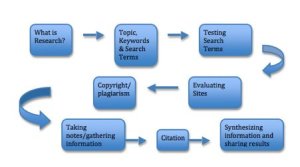
All of my students in grades three to seven will go through this process, with each lesson meeting them where they are and attempting to fill in gaps.
Choosing a Topic, Creating Keywords and Search Terms
All classes begin with a discussion about what research is and why we do it and how we do it. Each grade will be using their research and applying it to a larger question or problem. For instance, rather than having my third regurgitate answers back to me about animals, they will use the information they find to answer the larger question. (i.e. "Your parents said you can have any pet you want. What will you need to keep the pet?")
When creating search terms, I use a template to help my students in all grades through the process. They use the SweetSearch search engine, which weeds out the junk they usually find on Google or Bing and which highlights their keywords and pulls text from the website into the list of search results.
Taking Notes
Each grade will differ in how they take notes and share their results. My 3rd graders will most likely stick to paper and pencil notes due to the nature of my class schedule, but they will enter their websites into a Google Form to track where they've been and what they've found.
My older students will be using EasyBib to organize their links and their notes. While my third graders will not be doing true citation yet, I will be teaching citation to my seventh graders and requiring all of their projects to be accompanied by a bibliography, which they will create in EasyBib.
Whew! Teaching research is a HUGE task!
Here are some resources that help along the way:
- The SweetSearch Tutorial: Not only is SweetSearch an amazing search tool for kids, but they have some great resources here for helping digest what research is and how to approach it.
- Copyright Confusion Wiki: A one-stop shop for all things copyright and fair use.
- How to Do Research Another take on the research process from the Kentucky Virtual Library.
- Diigo for Educators A robust social bookmarking tool through which students can bookmark sites, highlight right on the site, share bookmarks with their peers and take notes on webpages. Teachers can create student accounts without needing emails.
- SweetSearch A kid-friendly search engine.
- EasyBib A robust online citation and organizing tool.
- Flickr Find copyright-free images with Creative Commons licenses.
- Search Creative Commons Find Creative Commons content on popular sites.


Comments (18)
Comment RSSSign in or register to post comments
Thanks, again!
Mary Beth,
Steal away! :) I figured that the diagram you posted can take an enormous amount of time. Unfortunately, my students are only "taught" computer skills for about 15 minutes during their library/media time--not nearly enough, in my opinion! Therefore, since I am their regular education teacher, I must teach "everything else", but I also want research included in this "everything else" because I know how imperative it is and will continue to be for them in their academic futures. Our library catalog system, which is online, contains a search engine for Internet research named Destiny--this might be what we use, along with some of the safe search engines you mentioned. Also, Destiny provides research and information by grade level--which will be even more helpful for differentiated instruction! I know that my students can surf the Internet--that isn't the question. But I must teach them the proper way to do it at school; also, not forgetting to teach the students what to do in the event that something inappropriate pops up on the screen! (That's bound to happen!) I will definitely take it a step at a time and also try to cover all possible bases. (If we start now, we should be done by May!?) Thank you, again!
Stacy Martinez
Janice
I'd love to see your graphic organizer! Feel free to message me.
Deb
Sorry for the delayed response. Thanks so much for the resource! I am not a media specialist/librarian and I have a lot of respect for your knowledge and expertise!
I love that idea for your
I love that idea for your animal research! I might steal it ;) As for further suggestions, as you state, research requires a lot of prerequisite work before turning the kids loose. The diagram in the post could easily take up an entire report card period! I would think backwards--what do you need your students to know how to do? Once you've whittled that down, then you can plan for how you will chunk and teach the process. For this project, I'm not going to go over finding copyright free images unless we have time. My main focus is on finding accurate information and synthesizing it.
Let me know how it goes!
Thank you for the resources!
Mary Beth,
Thank you for the websites! They will definitely come in handy for me. It was almost as though you were intentionally appealing to me! I teach third grade and one of the last [big] projects that my students will be working on this year is an animal report. When you mentioned that you do not want your students to regurgitate the information to you I could not agree more! This year, to put a new spin on things, I am going to take a more constructivist approach. Therefore, instead of the students simply looking up information on their selected animal and relaying that information to me, I will have the students pretend to BE that animal. In other words, after thorough research, the students will fill out a four-square graphic organizer--making sure to find out what their chosen animal looks like, eats, when and where it hunts, what type of bedding or nesting it lives in, and other interesting facts. Then, the students will have to pretend to BE that animal when writing their reports--by presenting their information in a way that would describe a day in their life as the chosen animal. (Duck--"I waddled to the pond to look for a bite to eat...") This way, the students will not only be obtaining the information, each student will also use the information in order to properly portray their chosen animal. To make this project even more enjoyable, when all of the students have completed their "animal report", I am going to have them present their animal report via video to the rest of the class while the rest of the class will guess what animal is being presented. I think the students will really enjoy this! I have never visited the website sweetsearch.com, however I think this website will be a great starting off point. Do you have any additional pointers as to how I can best teach the topic of researching the Internet? Or, would the flowchart you posted be the most suffice place to start? I know researching the Internet can [in and of itself] be a complete lesson--but it must be done prior to "turning the kids loose" online! Thanks again and thank you for taking the time to read this lengthy post!
Stacy Martinez
The Good Search!
I am an elementary librarian. I teach research skills in the library and have created website evaluations and graphic organizers to guide my students in their research process. I love your flow chart and SweetSearch! We should compare graphic organizers sometime!
Thanks for sharing your
Thanks for sharing your information. I am in a new grade this year (moved from 2nd to 5th) and am trying to figure out how I want the research process to work. This is the first year I am working with a grade that does a research project in the library (with our librarian) but then works on their research writing and presentation in with the classroom teacher. There's definitely a lot of pre-research and post-research planning and lessons to include in the process. For sure a huge task!
Hi Marybeth! In library land
Hi Marybeth! In library land we refer to Research as Inquiry and use this method in all kinds of information based learning experiences. I would look at Barbara Striplings Inquiry Model to slightly change things up next go round! A great new collaborative book is Teaching for Inquiry, Engaging the Learner Within. It's pricey and a bit library school textbook like, but I think it lends a bigger picture understanding of the process. Thanks for taking this on in a school w/o a library and library program. What a shame!
Deb